

Nonlinear Video Editing Software: How It Works for Long-Form Content and Shorts
Nonlinear video editing software lets you cut, rearrange, trim, layer, and revise footage without changing the original recording. For podcasters, streamers, YouTube creators, agencies, and teams handling sensitive footage, it is the practical foundation for turning one long video into many finished versions. A conventional nonlinear editor gives you timeline control; an AI-assisted editor adds transcript search, highlight suggestions, captions, reframing, and batch processing. The right choice depends less on the word “AI” than on how much editorial control, local processing, and repeatability your workflow requires.
What Nonlinear Video Editing Software actually is
“Nonlinear” describes the editing method, not a particular brand or level of complexity. In a nonlinear workflow, the source media remains available while your project stores instructions about what to show, where to place it, and how to process it. You can remove a section from the middle, move the ending to the beginning, create a shorter version, or reuse the same source clip in a different project without physically cutting the original file.
That is different from linear editing, where changes are made in a fixed sequence and later changes can require rebuilding downstream work. A nonlinear editor normally separates source media, project decisions, and exported output. This separation is what makes experimentation practical: an editor can test a 30-second vertical cut while preserving the full podcast episode.
The basic building blocks
- Bins or media libraries: organize camera files, screen recordings, music, graphics, and exported versions.
- A timeline: represents the order, duration, layers, transitions, and audio relationships in the edit.
- Tracks: keep dialogue, camera angles, screen captures, music, captions, and overlays separate enough to revise.
- In and out points: mark the usable portion of a source file without deleting the rest.
- Effects and titles: change presentation while leaving the underlying media available for later edits.
For example, a streamer may keep a four-hour VOD intact, select a reaction from minute 82, add a punch-in and captions, and export a short vertical version. The source VOD still exists, and the project can produce a horizontal highlight, a square preview, and a vertical social cut from the same material.
Nonlinear does not mean automatic
Automation can locate likely moments, generate a transcript, or suggest a crop, but it does not eliminate editorial judgment. A sentence may be technically complete yet lack the context that made it interesting. A guest’s expression may matter more than the loudest sentence. A medical, legal, or client-facing video may require review even when every word is transcribed correctly.
Think of AI as a search and preparation layer over a nonlinear timeline. It can reduce the time spent scanning footage, while the editor remains responsible for meaning, consent, accuracy, brand tone, and the final cut.
Why this workflow matters for repurposing teams
Long-form video creates a selection problem before it creates a cutting problem. A two-hour interview may contain several useful ideas, but locating them by dragging through a waveform is slow and difficult to delegate. Nonlinear editing software makes each candidate segment independently editable, so a team can turn one recording into a set of purpose-built assets rather than one shortened copy.
The value is especially clear when the same source must serve different audiences. A podcast producer may want an audiogram-style teaser, a talking-head vertical video, and a full YouTube episode. A social manager may need versions with different openings and captions. An agency may need to preserve the client’s original footage while producing approved excerpts for several channels.
Match the edit to the publishing job
Start with the destination and the viewer’s likely context, then work backward to the source moment. A strong clip for a professional audience may need a complete explanation. A fast social post may need the conclusion near the beginning. Neither should be treated as a random excerpt from the same timeline.
- Podcast episode: find one self-contained claim, keep enough setup to make it understandable, and remove repeated filler.
- Gaming VOD: preserve the reaction, game state, and payoff; a dramatic sound without context may confuse new viewers.
- Tutorial: show the problem, the action, and the visible result rather than only the speaker’s explanation.
- Business interview: confirm names, figures, permissions, and sensitive statements before publishing.
The following is an illustrative starting policy, not a universal performance benchmark: from a 90-minute interview, a team might shortlist 8 candidate moments, edit 4, approve 3, and publish 2 platform-specific versions of each. The important control is the review gate, not the exact numbers. A repeatable funnel prevents the team from exporting every AI suggestion.
Where local processing changes the decision
Cloud editing can be convenient, but some teams cannot or do not want to upload raw recordings. Client interviews, unreleased product demonstrations, internal meetings, and legal or medical material may require a workflow that keeps video files on an approved workstation. That is where a local AI video editing approach can be useful: the analysis and editing preparation happen on the local computer rather than requiring the source video to leave it.
Local processing does not automatically establish compliance or security. Teams still need to manage Windows accounts, backups, removable drives, access permissions, and exported files. The practical question is specific: where does the source footage go, which components process it, and what files remain after the project is complete?
How nonlinear editors and AI clipping systems work together
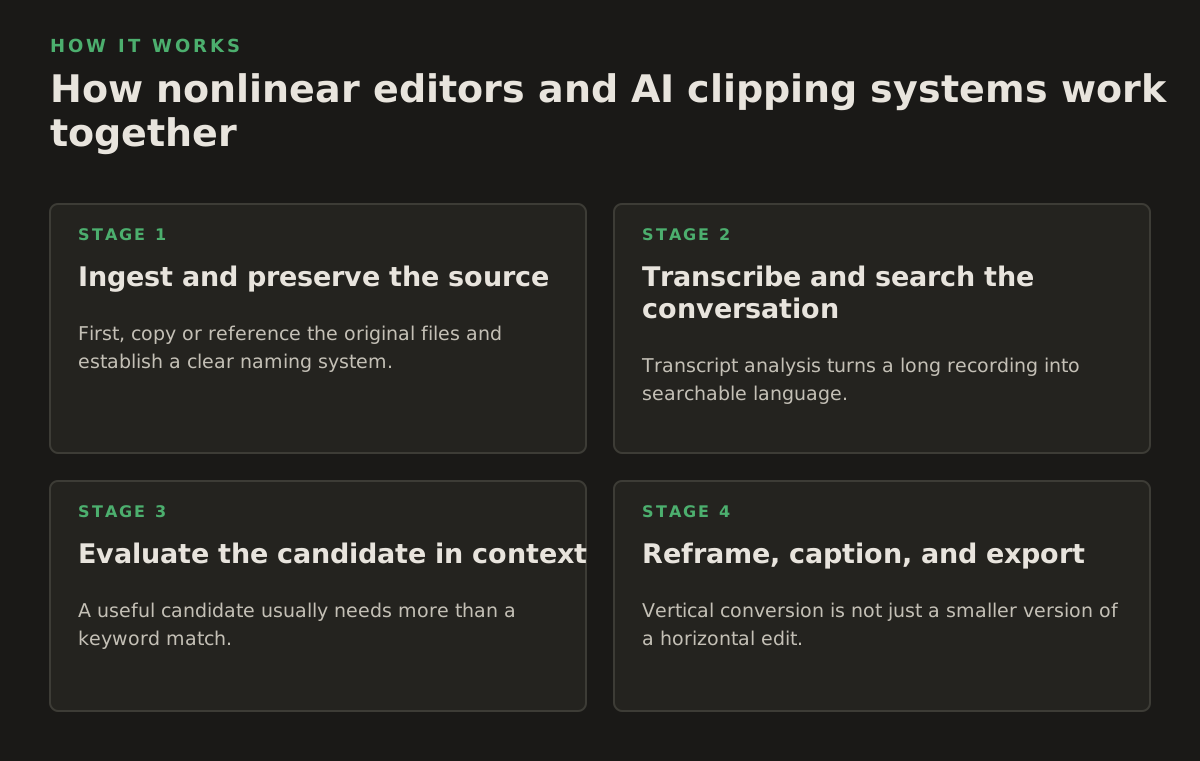
A traditional editor and an AI clipper solve different parts of the same workflow. The editor is optimized for exact decisions. The AI system is useful for reducing the search space. A sensible process lets automation propose candidates, then returns the work to a timeline where a person can inspect every cut.
1. Ingest and preserve the source
First, copy or reference the original files and establish a clear naming system. Keep the camera originals separate from proxies, project files, review exports, and final deliverables. If a recording has multiple speakers or camera angles, retain those relationships instead of flattening everything into one file too early.
For a local workflow, check that the application can analyze the formats you actually record. A tool that handles a standard webcam file may not handle a screen recording, variable frame rate phone video, or a separate audio recorder in the same way. Compatibility should be verified with a representative sample before a team adopts a process.
2. Transcribe and search the conversation
Transcript analysis turns a long recording into searchable language. A producer can look for a topic, phrase, speaker, or repeated idea instead of listening from beginning to end. The transcript is an index, not a substitute for the audio and video: misheard words, overlapping speakers, accents, jargon, and cross-talk still require playback review.
ClipForge is designed to analyze long-form footage locally, identify strong moments, and prepare short vertical videos. Its supplied product scope supports local transcript analysis and highlight detection. It is safer to describe this as candidate discovery rather than a guarantee that every important moment will be found.
3. Evaluate the candidate in context
A useful candidate usually needs more than a keyword match. Review the lead-in, the payoff, the speaker’s expression, and any visual material referenced in the dialogue. Some AI clippers may also offer visual signals such as shot or scene-change detection, but that is not a capability to assume for every product or workflow; verify it in the specific application’s documentation.
Use a simple decision test:
- Can a viewer understand the subject within the opening moments?
- Does the clip contain a complete idea, reaction, demonstration, or payoff?
- Can the editor remove pauses without creating unnatural jumps?
- Are names, numbers, claims, and permissions ready for review?
- Does the framing keep the important person or object visible in the intended aspect ratio?
4. Reframe, caption, and export
Vertical conversion is not just a smaller version of a horizontal edit. The crop must follow the speaker, guest, gameplay action, or demonstration. Automatic reframing can provide a useful first pass, but inspect moments where two people speak, a presenter points outside the center, or a screen recording contains small interface text.
Captions also need editorial review. Correct spelling, speaker changes, punctuation, line breaks, and timing. A caption that covers a product label or a person’s face may be technically synchronized but visually damaging. Build a reusable caption style, then make exceptions when accessibility or legibility requires them.
Before publishing, confirm the destination’s current technical requirements rather than relying on a remembered preset. YouTube’s official help documentation covers recommended upload encoding settings, including container, video codec, frame rate, and audio guidance; use that source when creating export presets instead of treating one preset as universal (YouTube Help: Recommended upload encoding settings).
For vertical deliverables, test the actual upload and preview experience. YouTube explains how vertical videos are displayed and how aspect ratio affects viewing on different devices in its official video-format guidance (YouTube Help: Video resolution and aspect ratios). Platform interfaces and recommendations can change, so export settings should be reviewed as part of the publishing checklist.
Where Nonlinear Video Editing Software breaks down
Flexibility creates choices, and choices create failure points. The most common problems are not dramatic software crashes; they are small editorial errors that survive because nobody owns the review step.
AI can select a plausible but weak moment
Highlight detection may favor excitement, strong language, or a clear sentence. Those signals are useful but incomplete. The selected segment may begin after the necessary context, end before the answer, or make a speaker sound misleading when shortened. Treat every automated suggestion as a candidate to verify, not as an approved cut.
Captions and reframing can be confidently wrong
Automatic captions can misrecognize names, acronyms, technical terms, and overlapping speech. Reframing can place the speaker off-screen when the visual emphasis changes. For client, legal, medical, or educational work, add a human transcript and crop check to the approval process. The cost of a short review is lower than correcting an inaccurate public statement.
Project complexity can become its own bottleneck
Large projects may contain duplicated media, multiple versions, cached analysis, proxies, and exports. Without conventions, editors lose time identifying which file is current. A workable folder structure might separate:
- 01_Source: original camera, audio, and screen-recording files.
- 02_Project: timelines, transcripts, graphics, and application project files.
- 03_Review: watermarked or draft exports awaiting notes.
- 04_Final: approved masters and platform-specific deliverables.
This is an illustrative organization scheme, not a requirement. The principle is to distinguish irreplaceable originals from disposable exports and to make approval status visible.
Local does not mean unlimited
Local AI avoids uploading the source to a remote service, but analysis still uses the workstation’s processor, memory, storage, and graphics capability. Batch jobs can compete with editing, and large source files can fill a drive. Schedule analysis outside live production when possible, keep working storage separate from archival storage, and test the workflow on the least powerful machine that must support it.
There is also a trade-off between privacy and convenience. A local workflow may require more setup, updates, storage planning, and manual publishing steps. That can still be the better choice when footage cannot be uploaded or when a team needs predictable control over its media.
How practitioners should choose and apply the workflow
Choose the editing system by the bottleneck you need to remove. If the problem is exact color, audio mixing, multicamera trimming, or detailed motion graphics, a full nonlinear editor should remain central. If the problem is finding useful moments in hours of speech, an AI-assisted local analysis layer may provide more value than another collection of manual effects.
A practical evaluation should use real footage, not a polished demo. Prepare one representative recording from each major format and ask the system to complete the same sequence:
- Import a long recording without altering the original.
- Locate several topics or likely highlights through transcript search or analysis.
- Open a candidate in an editable timeline and inspect its context.
- Generate a vertical version with captions and an adjustable crop.
- Process multiple candidates without confusing project, source, and final files.
- Confirm what remains local and what, if anything, is sent to an external service.
Score the workflow on editorial control, locality of processing, batch repeatability, and review effort. Do not judge it only by how quickly it produces a first draft. A fast draft that requires extensive correction may be slower overall than a slower system that preserves context and gives editors clean controls.
A role-based operating model
For a podcast team, the producer can approve the candidate list while an editor handles context, captions, and sound. For a streamer, the first pass can focus on reactions and gameplay outcomes, with a manual check for spoilers and missing setup. For a social manager, templates can standardize opening text, caption placement, and file naming while leaving the hook and crop editable.
Agencies should add a client approval stage before publication. Legal and medical teams should define prohibited destinations, retention rules, and who may review exports. Businesses handling confidential footage should document whether local processing is mandatory, preferred, or merely convenient. These policies make the tool selection testable instead of relying on vague claims about privacy.
If a team already uses a desktop editor, an AI clipper does not need to replace it. It can function as a discovery and preparation tool, with approved candidates moving into the editor for finishing. Teams comparing dedicated clipping workflows can also review this OpusClip alternative guide, while keeping the evaluation focused on their own footage, review process, and publishing requirements.
Which setup is the practical choice in 2026?
For many repurposing teams in 2026, a local-AI-plus-nonlinear-editor workflow is a practical option when the work combines sensitive footage, high-volume candidate discovery, and a need for precise finishing. It is a recommendation for a particular set of constraints, not a universal industry conclusion. Teams with simple edits, permissive cloud policies, or very small output volume may reasonably choose a different setup.
Use a local AI clipper when the main cost is searching long recordings and preparing repeatable short-form drafts. Keep a capable nonlinear editor in the process when the work demands detailed audio, color, graphics, multicamera control, or careful context. In every case, retain a human approval gate for claims, captions, framing, permissions, and final exports.
ClipForge fits the local-analysis portion of that workflow: it processes long-form footage on a Windows desktop, identifies potential highlights, and supports captions, reframing, batch processing, and optional YouTube publishing without uploading video files to the cloud. Explore ClipForge if that combination matches your team’s privacy and repurposing requirements.
Authored with NotFair SEO