

Video Clips: How to Find, Edit, and Publish Better Short-Form Content
Video clips are short, purpose-built excerpts from longer footage, edited for a specific audience, platform, and viewing context. The practical workflow is to identify a complete moment, remove setup and dead air, add accurate captions, reframe the speaker or action for vertical viewing, review the result, and publish it with a useful title. For podcasters, streamers, YouTube creators, agencies, and teams handling sensitive footage, local AI can accelerate discovery without requiring the original video files to leave a Windows computer.
What Video Clips actually are
A clip is not simply a shorter copy of a long video. It is an editorial unit with its own beginning, useful middle, and payoff. A 45-minute interview may contain an 18-second answer, a contrarian opinion, or a story that works independently. The editing job is to preserve enough context for the viewer to understand the point without forcing them to watch the full episode first.
This distinction matters because automated clipping systems can identify speech, pauses, faces, scene changes, and recurring topics, but those signals do not automatically create a satisfying story. A strong candidate normally answers at least one of these questions quickly:
- What problem is being solved?
- What surprising claim or opinion is being made?
- What concrete result, mistake, or lesson is being shown?
- Why should the viewer continue instead of scrolling?
For example, a podcast clip about “marketing” is too broad to guide an edit. A clip built around “the first paid campaign failed because the landing page asked for too much information” has a clear subject, tension, and takeaway. The second version gives the caption editor, reviewer, and publishing team something specific to preserve.
One source can produce several different clip types
Long-form footage usually contains more than one kind of reusable moment. A streamer’s VOD may yield a reaction clip, a tutorial, and a funny failure. A medical business may have an educational explanation, while a legal team may have a carefully approved answer to a recurring client question. Treating all clips as interchangeable leads to inconsistent pacing and weak packaging.
- Answer clips: one direct response to a question, usually useful for search and education.
- Story clips: a setup, complication, and resolution drawn from an interview or presentation.
- Reaction clips: a visible emotional response supported by enough surrounding audio to make it intelligible.
- Process clips: a demonstration, before-and-after, or sequence of steps.
- Opinion clips: a defensible claim that invites discussion without misrepresenting the speaker.
The category affects the edit. A reaction often needs the visual response immediately. An answer may need a short question card or spoken setup. An opinion clip needs context and careful review so a sentence is not made more extreme by removing the surrounding qualification.
Why a deliberate clip workflow matters
The value of clipping is not just producing more posts. It is reducing the time between an original recording and a useful distribution asset while retaining editorial control. One interview can support a week of social posts, a vertical excerpt for a channel, and a set of review candidates for a social media manager. That only works when the clips remain accurate and recognizable as the creator’s work.
Volume creates a quality problem. A team publishing five clips a week can manually inspect every candidate. A team processing several shows, VODs, or client accounts needs a repeatable way to decide what deserves attention. AI is useful for narrowing the search space; a human should still decide whether the moment is relevant, fair, safe, and worth publishing.
Short-form viewing changes the editing priorities
Vertical video puts different pressure on the source. A two-person podcast shot in a wide frame may leave both faces too small after a crop. A gaming stream may contain important interface details near the edge. A product demonstration may depend on text that becomes unreadable when reduced to a phone screen. Reframing is a content decision, not merely a change from 16:9 to 9:16.
Captions have a similar role. They support viewers watching without sound, but inaccurate captions can change meaning, especially with names, technical terms, medical language, legal phrases, or game-specific vocabulary. YouTube’s official caption documentation describes caption tracks as timed text associated with a video, including their language and track properties; that makes timing and language selection part of the publishing workflow rather than a decorative overlay. See the YouTube Data API captions documentation for the platform-level model.
For teams working with private recordings, the storage path also matters. Uploading source footage to a remote service may conflict with a client agreement, internal policy, or professional duty. A local AI video editing workflow keeps analysis on the Windows machine, subject to the organization’s own device, access, backup, and deletion controls. Local processing does not magically make a workflow secure; it does remove cloud transfer of the video files from the default pipeline.
How an AI clipping workflow works
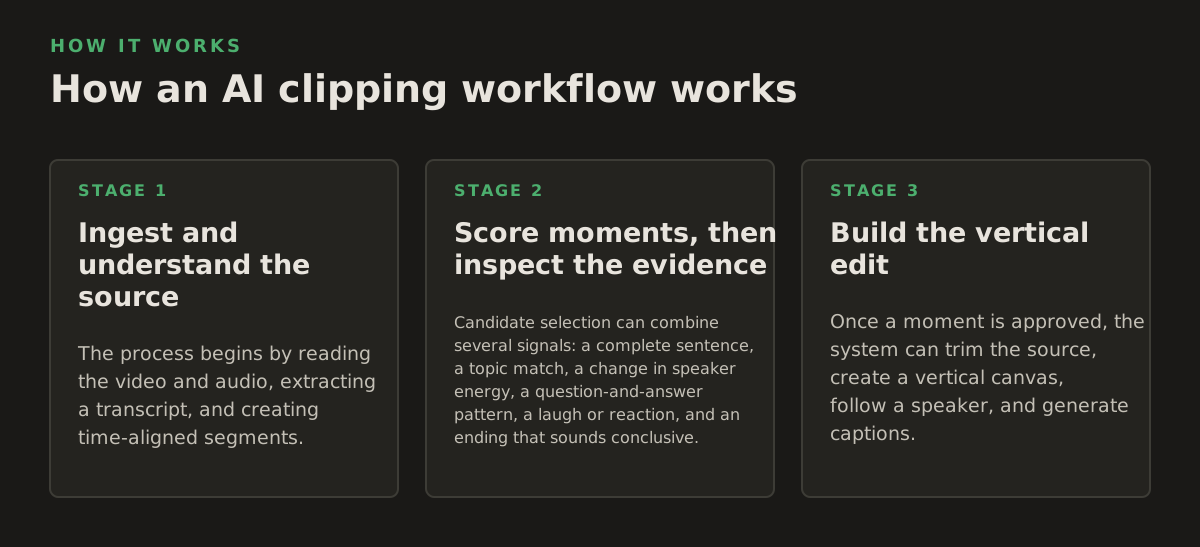
A practical system breaks the job into separate stages. Combining every stage into one “make clips” button makes it difficult to diagnose errors. If a candidate is poor, you want to know whether the problem came from transcription, moment selection, framing, or editorial review.
1. Ingest and understand the source
The process begins by reading the video and audio, extracting a transcript, and creating time-aligned segments. A local speech-to-text model can provide the searchable text needed to locate names, topics, and phrases. OpenAI’s Whisper repository documents an automatic speech recognition model and its installation and model options, but transcript accuracy still varies with microphones, accents, overlapping speakers, music, and technical vocabulary. The reference is useful for understanding the underlying transcription task, not as a guarantee for every recording: Whisper’s official repository.
Useful metadata can include:
- speaker changes and approximate speaking turns;
- silence, pauses, and unusually fast or slow speech;
- scene changes and available faces;
- keywords, questions, repeated topics, and emotional language;
- the source timecode for every proposed start and end point.
Timecode is essential. A transcript without reliable timing helps search, but it cannot produce a clean cut by itself. The editor needs to know where a sentence begins, where a speaker finishes a thought, and whether the next shot changes the meaning.
2. Score moments, then inspect the evidence
Candidate selection can combine several signals: a complete sentence, a topic match, a change in speaker energy, a question-and-answer pattern, a laugh or reaction, and an ending that sounds conclusive. Candidate scoring is a prioritization tool, not an objective measure of quality. A loud reaction may be memorable but unusable without context; a quiet explanation may be highly valuable to a professional audience.
Use scores to create a review queue rather than to publish automatically. A useful review screen should expose the transcript, source timecode, proposed boundaries, aspect-ratio preview, and any detected faces. This lets an editor reject a bad premise quickly instead of rendering multiple versions first.
For an illustrative starting policy, a podcast team could ask the system for 20 candidates from a 60-minute episode, keep 8 for human review, and publish 3 after checking context and captions. Those numbers are workflow examples, not universal benchmarks. The right ratio depends on the show, recording quality, audience, and risk tolerance.
3. Build the vertical edit
Once a moment is approved, the system can trim the source, create a vertical canvas, follow a speaker, and generate captions. Automatic reframing works best when the subject is visible and the intended focal point is obvious. It becomes less reliable when two people speak from opposite sides of a wide frame, when a speaker moves quickly, or when the important object is not a face.
Caption styling should serve comprehension. Keep lines short enough to scan, avoid covering a speaker’s mouth or important product detail, and check punctuation around interruptions. A caption that is technically synchronized but blocks a chart is still a failed edit. Review the first and last words carefully: abrupt cuts often make a clip feel unfinished even when the middle is strong.
For vertical exports, a sensible checklist includes:
- the main subject remains visible throughout the crop;
- captions stay inside a safe area and do not compete with platform controls;
- the first spoken line makes sense without a missing setup;
- the ending lands on a completed thought rather than an accidental cutoff;
- the audio is clear enough to survive phone speakers and noisy environments.
Where automated video clipping breaks
Automation fails in predictable ways. Knowing the failure modes helps teams design a review gate instead of blaming the tool for problems that require editorial judgment.
Context and meaning
A sentence can look compelling in a transcript while being misleading in isolation. “We stopped using it” may refer to one feature, one test, or one failed version, not the entire product. A clip from a legal, medical, financial, or safety-related discussion may also need surrounding qualification. Context review is mandatory for high-consequence topics, even if the system’s cut is visually polished.
Reviewers should compare the candidate with the source, not only read the generated captions. Listen for negations, sarcasm, overlapping speech, and references such as “this” or “they” whose meaning depends on the previous sentence. If a claim could affect a client, patient, customer, or legal position, route it through the organization’s existing approval process before publication.
Visual and audio limitations
Some footage is simply a poor fit for automatic vertical conversion. A slide deck with small text, a three-person panel, a screen recording with edge controls, or a dark gaming stream may need a custom layout. The right response is not always to force a crop. It may be better to use a centered frame, alternate between speakers, add a designed text panel, or reject the moment.
Common technical problems include:
- cross-talk that produces blended or incorrectly attributed captions;
- proper names and specialist terms transcribed incorrectly;
- camera cuts that make face tracking jump;
- music, applause, or game audio competing with speech;
- captions extending beyond the safe area after export;
- an ending that loses the final word because the source waveform was trimmed too tightly.
Local processing also has constraints. A Windows computer needs enough storage for the source, temporary files, models, and exported versions. Processing speed depends on the hardware and model selected. If a team uses a shared workstation, establish who can access projects and where completed exports are retained. Local does not mean unmanaged: permissions, encryption, backups, and deletion rules still belong in the operating procedure.
How practitioners apply Video Clips by role
The best workflow starts with the publishing job, not the AI feature list. Each audience has a different definition of a successful clip.
Podcasters and interview teams
Mark the episode’s recurring themes before searching for moments. For a business podcast, that might mean pricing, hiring, product failures, and customer research. Generate candidates around those themes, then preserve the guest’s full answer rather than cutting directly to the most provocative sentence.
A useful batch can include one discovery clip, one practical lesson, and one personal story. Put the episode or guest context in the post description, but make the video understandable on its own. If a name or technical term is important, verify it against the recording before exporting captions.
Streamers and gaming creators
VODs contain long stretches of low activity, so search for event boundaries: the decision before a play, the reaction immediately after it, and the explanation that makes the moment interesting. Do not remove every pause automatically; a short pause before a reveal can be part of the entertainment.
Keep game UI visible when it proves what happened. A face-only crop may capture the streamer’s reaction but discard the score, map, item, or error that gives the reaction meaning. Create separate templates for gameplay, commentary, and face-cam moments instead of applying one crop policy to every VOD.
YouTube creators and social media managers
Build a content matrix before batch processing. For each source video, assign candidate clips to audience questions, objections, demonstrations, and memorable statements. This avoids publishing six near-identical excerpts that all make the same point.
Titles and descriptions should match the actual clip. Avoid promising a full tutorial when the excerpt only introduces a step. If the workflow publishes to YouTube, account permissions and metadata still require attention. The YouTube Data API documents video upload through videos.insert, including the authorization requirements and request structure; see the official videos.insert documentation before designing an automated publishing process.
Agencies, legal teams, and medical businesses
Use a two-stage queue: AI-assisted selection first, authorized human approval second. Keep source references attached to every export so a reviewer can locate the original statement. Store a record of caption corrections, crop changes, approver, and publication destination when the content carries client or professional risk.
For sensitive footage, define a policy before processing:
- identify which folders and projects may be analyzed locally;
- restrict access to source files and generated exports;
- decide how long temporary files and rejected candidates remain;
- require approval for claims, client appearances, and identifying details;
- separate approved exports from drafts so the wrong version is not published.
A practical operating policy for better clips
Start with a narrow repeatable workflow rather than trying to automate every creative decision. Choose one source type, such as two-person interviews or single-speaker tutorials, and define what “publishable” means for it. A clear policy might require a complete thought, readable captions, a stable crop, a source timecode, and a named reviewer.
Then measure the process with operational questions:
- How many candidates require boundary changes?
- Which words or speakers produce the most caption corrections?
- How often does reframing lose the important visual?
- Which clip types are actually approved and published?
- How many exports are rejected because the source lacks context?
These measurements are more actionable than a vague goal to “make more short-form content.” If most edits fail because of poor audio, improve recording before changing the clipping model. If candidates are relevant but endings feel abrupt, adjust boundary review. If the crop fails on panels, create a different layout rather than lowering the quality standard.
For teams comparing workflows, a purpose-built desktop tool can be a useful middle ground between fully manual editing and an unmanaged upload pipeline. ClipForge is designed for Windows users who want local analysis of long-form footage, automatic captions, reframing, batch processing, and optional YouTube publishing without uploading video files to the cloud. If those constraints match your work, explore ClipForge as a practical way to turn approved source moments into repeatable short-form outputs through ClipForge.
Authored with NotFair SEO