

Video Summary AI: How to Turn Long Videos Into Useful Short Clips
Video summary ai is software that analyzes spoken words, on-screen events, and the surrounding context of a long video to produce a concise explanation of what happened. In a clipping workflow, that summary is not the finished product. It is an index of likely moments that helps a podcaster, streamer, YouTube creator, or social media manager decide which sections deserve a short-form edit.
That distinction matters. A transcript can tell you what was said. A summary can tell you what the episode is about. A useful video summarizer goes further by identifying candidate segments, their subjects, their emotional turns, and their potential audience value. It may then support captions, reframing, trimming, and export. The human still needs to verify the quote, context, visual quality, and publishing goal.
What Video Summary AI actually does
A long recording contains several different information layers. Speech carries the explicit argument. Audio contains pauses, laughter, interruptions, and emphasis. Images show demonstrations, reactions, slides, gameplay, or guests entering the frame. Timing reveals whether a point builds gradually or lands as a self-contained moment.
Video summary AI combines these signals into a searchable representation of the file. The result can be a paragraph, chapter list, searchable transcript, ranked highlight list, or set of suggested clips. These outputs are related, but they solve different jobs:
- Transcript: a time-aligned record of spoken language, useful for searching and caption creation.
- Summary: a compressed explanation of the main topics, claims, and outcomes.
- Chapters: topic boundaries that divide an episode into navigable sections.
- Highlights: selected time ranges that appear promising for a specific audience or format.
- Short-form draft: a rendered or editable vertical video with a chosen duration, crop, captions, and opening frame.
Summary is not the same as highlight selection
A summary optimizes for coverage: it tries to represent the important ideas in the entire recording. A highlight system optimizes for attention and usefulness: it looks for a moment that can stand alone in a feed. Those objectives can conflict.
For example, a legal podcast may spend 12 minutes carefully defining a term before delivering one memorable warning. The summary may prioritize the definition because it represents the episode accurately. A clip editor may choose the warning, then add enough setup to avoid making the statement misleading. A gaming stream may contain no polished argument at all; the strongest moment could be a reaction, a reversal, or a sequence of play that only makes sense with a few seconds of visual lead-in.
The prompt or selection goal changes the output. “Summarize this episode” asks for broad coverage. “Find three clips for small-business owners that each make sense without the rest of the episode” asks for audience filtering, independence, and editorial judgment.
The unit of value is the usable moment
For repurposing, the most useful AI output is usually not a polished paragraph. It is a combination of:
- a precise start and end time;
- a short explanation of why the segment matters;
- the central claim or event;
- the people or objects visible on screen;
- the amount of context needed before the payoff;
- possible caption or title language that does not distort the source.
Think of the summary as a map. It reduces the cost of locating material, but it does not remove the need to inspect the road.
Why summaries matter for high-volume video teams
The bottleneck in repurposing is often not rendering. It is deciding what to make. A weekly podcast, daily stream, or client archive can contain many hours of footage, while the publishing team has limited time to review it. A reliable summary layer creates an editorial queue before anyone spends time polishing captions and framing.
For a podcaster, the summary can expose several distinct clip angles from one conversation: a surprising answer, a practical checklist, a disagreement, and a personal story. For a streamer, it can separate routine gameplay from high-stakes moments. For a social media manager, it can group candidate clips by campaign theme instead of forcing a manual watch from beginning to end.
The main benefit is triage, not automation theater. The system should help a person answer three practical questions quickly:
- Which moments are relevant to this audience?
- Can each moment stand on its own after a short edit?
- Is the source accurate and safe to publish in this context?
A worked repurposing example
Consider an illustrative starting policy for a 90-minute business podcast. The team wants clips for YouTube Shorts, Instagram Reels, and TikTok, but it does not want to publish every interesting sentence. It asks the summarizer to identify moments containing a clear claim, a concrete example, a disagreement, or a practical action.
- 90-minute recording reviewed by the analysis system.
- 12 topic segments returned for editorial inspection.
- 8 candidate moments marked as potentially self-contained.
- 4 moments retained after checking context and factual wording.
- Each retained moment edited into a 35–60 second vertical draft.
- 1 longer segment kept for a two-minute YouTube upload because its explanation needs more setup.
These numbers are an illustrative workflow example, not a performance benchmark. The point is the decision sequence: broad discovery, human filtering, then production. A system that returns 40 “highlights” may create more review work than it saves if the clips lack context or repeat the same point.
Why local processing changes the operating model
Some footage should not be sent to a remote service merely because it needs captions or clip suggestions. Agencies may handle unreleased campaigns. Medical teams may work with sensitive recordings. Legal teams may process interviews or depositions. Businesses may have internal discussions that are not intended for third-party infrastructure.
Local processing keeps the source workflow on the organization’s own computer, subject to its device controls, storage practices, and access policy. It does not automatically make a workflow compliant with every legal or industry requirement; permissions, retention, backups, and exports still need review. But keeping video files local can remove one important transfer decision from the pipeline.
ClipForge is designed as a Windows desktop AI video clipper that analyzes long-form footage locally, identifies strong moments, and turns them into short vertical videos. Its practical fit is strongest when a team wants discovery and formatting without uploading the underlying video files to the cloud. The site’s guide to local AI video editing explains that operating model in more detail.
How a video summarizer turns footage into clip candidates
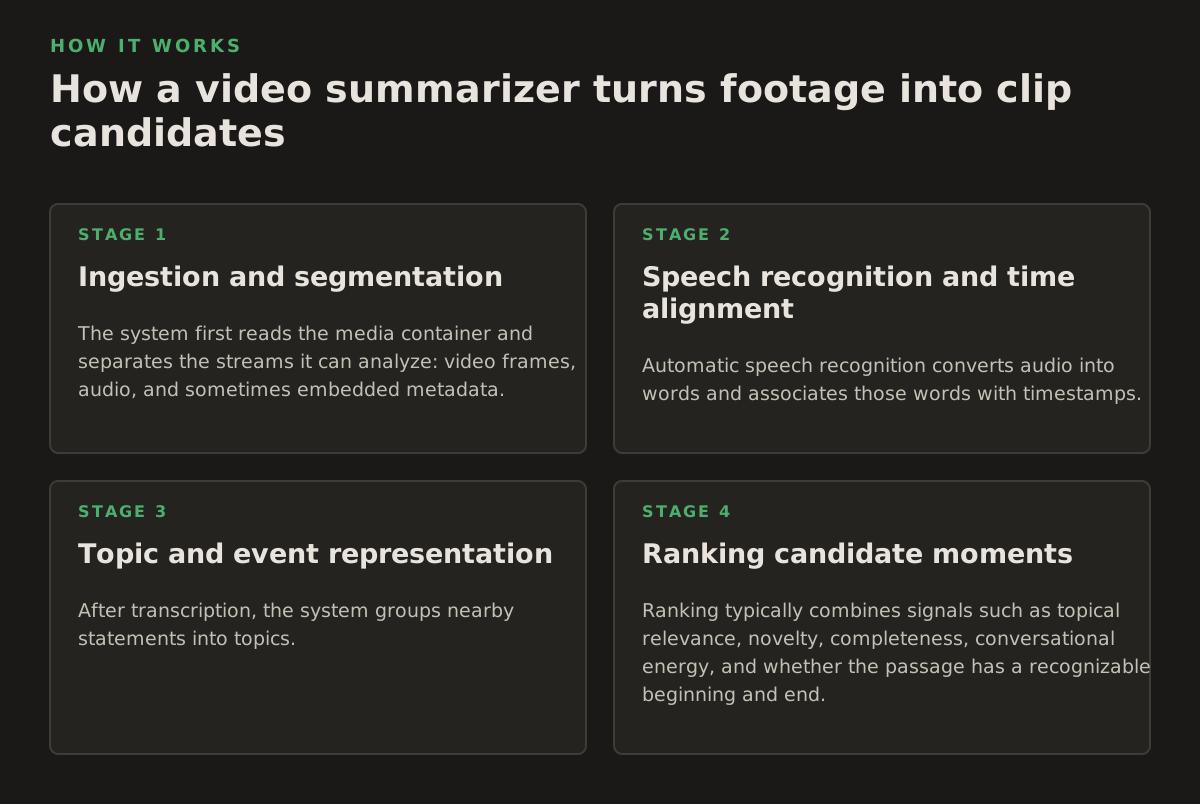
The output looks simple, but several mechanisms sit underneath it. Understanding them helps creators diagnose bad results instead of treating an AI suggestion as a verdict.
1. Ingestion and segmentation
The system first reads the media container and separates the streams it can analyze: video frames, audio, and sometimes embedded metadata. It divides the recording into manageable windows, while trying to preserve sentence boundaries and scene changes.
Fixed windows are easy to implement but can cut through a thought. Semantic segmentation tries to end a section when the speaker finishes a topic or when the visual situation changes. Neither method is perfect. A speaker can begin answering one question, take a detour, and return to the original point several minutes later.
2. Speech recognition and time alignment
Automatic speech recognition converts audio into words and associates those words with timestamps. This enables search, caption timing, and phrase-level retrieval. Accuracy depends on microphone quality, accents, overlapping speakers, background noise, specialist vocabulary, and whether the recording contains music or gameplay audio.
Automatic captions are useful only when the timing and wording are checked. The W3C guidance on captions describes captions as including spoken dialogue and meaningful sound information, not merely a decorative transcript. That matters for a clip where a door slam, crowd reaction, or laugh changes the meaning of the spoken line.
3. Topic and event representation
After transcription, the system groups nearby statements into topics. It may identify entities, repeated terms, questions, answers, claims, or changes in sentiment. Video-aware analysis can add visual events such as a product being shown, a screen changing, or a face entering the frame.
Topic detection is probabilistic, not editorially authoritative. A repeated phrase may be a verbal habit rather than the main idea. A quiet answer may be more valuable than a dramatic reaction. The model needs a selection brief that describes the intended audience and format.
4. Ranking candidate moments
Ranking typically combines signals such as topical relevance, novelty, completeness, conversational energy, and whether the passage has a recognizable beginning and end. A candidate that starts with “as I said earlier” may score well for importance but poorly for standalone viewing.
For short-form production, add format constraints:
- Does the first sentence create a reason to continue?
- Can the speaker’s answer be understood without the previous question?
- Is the visual subject visible after reframing to a vertical canvas?
- Does the segment contain a natural ending rather than an abrupt cutoff?
- Can captions fit without covering important interface elements or demonstrations?
5. Drafting, reframing, and export
Once a moment is selected, the editing layer can trim the range, generate captions, reframe a horizontal source for vertical viewing, and batch several outputs. Reframing is not simply a crop. It is a choice about whose face, which object, or what part of the screen should remain visible as the composition changes.
Export settings should match the destination rather than relying on a universal preset. YouTube’s official Shorts help page documents the platform’s current definition and upload considerations; check the current requirements in 2026 before standardizing a production template. If the workflow publishes through the YouTube API, Google’s videos.insert documentation explains the resource fields and authorization requirements for uploading a video.
Optional YouTube publishing can shorten the handoff, but it should not bypass review. A locally generated draft and a published video are different stages with different consequences.
Where Video Summary AI breaks
Most failures are not mysterious. They occur where context, audio quality, visual meaning, or publishing risk exceeds what the system can infer from the file.
Context loss and misleading compression
A short clip can be technically accurate and still misleading. The speaker may be quoting someone else, answering a hypothetical, or reversing an earlier position. Removing the question can change the meaning of the answer. Cutting laughter or an objection can make a collaborative exchange look hostile.
Never approve a clip from the summary alone. Read or watch enough surrounding material to establish what the speaker meant. A practical review window might include the full sentence before the proposed start, the complete answer, and the next exchange. That is a starting policy for editorial review, not a universal rule.
Recognition errors
Names, drug terms, technical acronyms, legal citations, product models, and numbers are common failure points. A transcript can look fluent while changing one word that reverses the claim. This is particularly dangerous for medical, financial, legal, and regulated business content.
Use a verification pass for:
- proper names and company names;
- dates, percentages, prices, and measurements;
- negations such as “not,” “never,” and “without”;
- specialist terms that may be rendered as common words;
- speaker attribution when people interrupt or speak off-camera.
Where accuracy is consequential, compare the caption text with the audio and, when appropriate, the approved script or source document. Caption correction is an editorial control, not cosmetic cleanup.
Visual and timing failures
Audio may identify an excellent sentence while the corresponding video shows a blank slide, an unflattering pause, a browser tab containing confidential information, or a gameplay HUD that becomes unreadable after cropping. A vertical crop may also cut off hand gestures, subtitles burned into the original, or the object being demonstrated.
Review the candidate in its intended aspect ratio. Do not assess a horizontal preview and assume the vertical export will work. If the speaker is moving, check whether tracking keeps the important subject inside the frame. If the source has two speakers, decide whether to use a split layout, alternate crops, or a wider composition.
Repetition and false variety
Long interviews often circle a few themes. A summary system may return several clips that sound different but make the same point. This creates a weak publishing calendar and can annoy subscribers who see the same idea repeated.
Cluster clips by claim before scheduling them. Keep the strongest version, or deliberately assign different versions to different audiences. For example, a founder’s pricing explanation might become one educational clip, while a customer story from the same section becomes a separate proof-oriented clip. They should not both be labeled as new insights.
Privacy and operational boundaries
Local analysis reduces the need to transfer source footage, but it does not eliminate risk. Temporary files, exports, caption text, thumbnails, logs, and published drafts can all contain sensitive information. A team policy should specify who may access the project folder, how exports are retained, and what happens when a project is archived.
For agencies and legal or medical teams, document the review boundary before production begins. Decide whether AI-generated summaries may be stored, whether client approval is required before captions are generated, and whether a human must inspect every frame for confidential material.
How practitioners should use summaries in a real workflow
The best workflow gives the system a narrow job and gives the editor clear veto power. Start with the publishing objective, not with the tool’s list of capabilities.
For podcasters: search by audience problem
Ask for moments that answer a specific listener question rather than “the best parts.” A business podcast might need clips for first-time managers, independent consultants, or software buyers. Those audiences will value different sections of the same episode.
- Define one audience and one problem for the clip batch.
- Request candidate moments with timestamps and the surrounding topic.
- Reject clips that require an unseen question or an earlier definition.
- Correct names, figures, and captions against the recording.
- Write a short title that states the benefit without exaggerating the claim.
For streamers: separate spectacle from explanation
VODs contain several types of short-form material: a high-skill play, a surprising failure, a reaction, a strategy explanation, and community interaction. They should not all use the same opening or caption style.
For a gameplay moment, inspect the seconds before the event. The buildup may explain why the play matters. For a reaction, preserve enough of the trigger for the audience to understand it. For an instructional clip, remove dead air but keep the steps in order. The summary helps locate these categories; it cannot decide which category fits the channel’s identity.
For YouTube creators: design around the crop
Recordings made for widescreen often contain a speaker on one side, a guest on the other, and slides in the middle. A vertical edit needs a composition plan before export. Automatic reframing can provide a draft, but a creator should inspect every cut where the active subject changes.
Use a consistent review checklist:
- Watch the first two seconds with sound off and confirm that the visual entry is understandable.
- Read every caption for spelling, timing, line breaks, and dangerous ambiguity.
- Check that faces, hands, demonstrations, and screen text survive the vertical crop.
- Listen for clipped words at the start and end of the segment.
- Confirm the title and description promise only what the clip delivers.
That first-second check is an editorial starting policy, not a platform guarantee. The broader principle is to inspect the actual viewing experience, not only the transcript.
For social media managers: batch by decision, not by file
Batch processing is most useful when the inputs share a policy. For example, a team may process all clips from one campaign using the same caption position, aspect ratio, naming convention, and approval queue. It is less useful to produce a large mixed batch that still requires individual decisions about audience, sensitivity, and context.
A workable batch record can include:
- source filename and episode date;
- candidate start and end time;
- target audience and channel;
- editorial claim or event;
- caption review status;
- privacy or client approval status;
- export filename and publication status.
This turns an AI output into an auditable production queue. It also makes it easier to remove a clip later if a client changes its approval or a factual detail becomes outdated.
For agencies and sensitive teams: make local processing a policy choice
When footage cannot leave a controlled workstation, select tools and workflows that support local analysis. ClipForge’s Windows desktop workflow is aimed at this use case: long-form footage can be analyzed on the local machine, then turned into captioned, reframed vertical drafts with batch processing and optional YouTube publishing.
Still, local does not mean automatic approval. Establish a written sequence:
- Copy source footage into an access-controlled project folder.
- Run analysis and generate candidate summaries or clips locally.
- Review transcript accuracy and remove sensitive segments.
- Approve the vertical composition and captions.
- Export only the files required by the client or publishing channel.
- Apply the team’s retention and deletion policy to source and derived files.
For teams comparing workflows, the relevant question is not whether a tool produces an attractive demo. Ask whether it supports the required processing location, review controls, export behavior, and publishing handoff. ClipForge’s OpusClip alternative page may help frame that evaluation, but the final choice should follow the organization’s footage and approval requirements.
A practical recommendation for choosing and using a video summarizer
Choose a video summary system based on the failure you need to prevent. If your problem is finding topics in a large archive, prioritize searchable transcripts and dependable timestamps. If your problem is producing vertical drafts, prioritize reframing control, caption correction, and batch export. If your problem is handling restricted footage, prioritize a local workflow and clear file management.
Before adopting a process, run a representative sample that includes clean dialogue, interruptions, names, numbers, screen demonstrations, and at least one segment that should be rejected. Score the output on concrete questions:
- Can an editor locate the right moment without watching the entire source?
- Are start and end times close enough to create a useful first draft?
- Does the summary preserve the difference between a claim, a question, and a quotation?
- Are captions easy to correct without rebuilding the edit?
- Does vertical reframing keep the important subject visible?
- Can the team explain why a rejected clip was unsafe, repetitive, or incomplete?
Treat AI as a discovery and drafting layer, not as the final editor. The strongest workflows use automation for repetitive locating, captioning, reframing, and batch preparation, while people retain responsibility for context, accuracy, privacy, and channel fit.
For Windows teams that want to keep source footage on the local machine while turning long recordings into captioned vertical clips, ClipForge offers local analysis, strong-moment detection, reframing, batch processing, and optional YouTube publishing. Explore ClipForge if that matches your production and review requirements.
Authored with NotFair SEO